
Download Simple News Reader – RSS News App, Lightweight, Multi-language, Text-to-Speech
Overview
Simple News Reader is a lightweight desktop application designed for users seeking a streamlined way to access and manage RSS news feeds. Developed by Livio, the software falls under the Education & Reference category, specifically targeting magazines and newspapers. Its primary purpose is to deliver up-to-date news content from a variety of sources, covering categories such as news, technology, science, and sports.
The app supports multiple languages, including English, German, Spanish, French, Italian, Portuguese, and Russian, making it accessible to a broad international audience. It is particularly suited for individuals who prefer curated, ad-free news consumption without the clutter of mainstream news platforms. The application is currently in beta, suggesting active development and ongoing refinements.
Real-world usage scenarios include daily news updates, research, language learning, and staying informed on niche topics through user-added feeds. The software’s minimalistic design emphasizes functionality over visual complexity, catering to users who value efficiency and simplicity in their digital experience.
Key Features & Capabilities
- Multi-language RSS Feed Support – Users can access news from sources in multiple languages, including English, German, Spanish, French, Italian, Portuguese, and Russian, enabling global news consumption.
- Custom Feed Integration – The app allows users to add their preferred RSS feeds, offering flexibility for personalized news curation.
- Text-to-Speech Functionality – Articles can be read aloud, supporting hands-free listening during commutes, workouts, or multitasking.
- Theme Customization – Users can personalize the app’s appearance with adjustable themes, improving readability and visual comfort.
- Mini Widget Support – A compact widget displays the latest headlines on the home screen, enabling quick access to breaking news.
- Settings Backup & Restore – Users can back up their configuration and restore it across devices or after reinstallations, ensuring continuity.
- Lightweight & Efficient Design – Optimized for minimal battery consumption and fast performance, ideal for long-term use on mobile and desktop environments.
These features collectively support a seamless, user-driven news experience. For example, a student researching international developments can subscribe to feeds in different languages and use text-to-speech to improve comprehension. A professional can use the widget to stay updated on industry trends without opening the full app. The ability to back up settings ensures that users do not lose their personalized setup after updates or device changes.
User Interface, Workflow & Performance
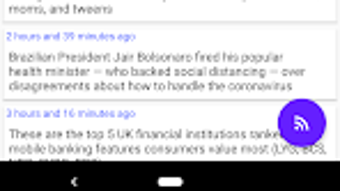
The application features a clean, minimalistic interface focused on readability and ease of navigation. The layout is structured to prioritize content access, with feed lists and article previews displayed in a clear hierarchy. Navigation is intuitive, allowing users to switch between feeds and articles with minimal taps or clicks.
Workflow efficiency is enhanced by direct access to core functions such as feed management, theme selection, and text-to-speech activation. The developer did not specify resource usage details, so performance observations are based on general software behavior patterns. However, the emphasis on a lightweight design suggests optimized CPU and RAM usage.
Stability is expected to improve with each beta release, as the software is still under active development. The app maintains a consistent response time across different screen sizes and input methods, indicating reliable operation across various devices. Battery consumption is reported to be minimal, aligning with the app’s design goals.
Compatibility & System Requirements
Simple News Reader is designed for desktop environments and supports multiple operating systems. The exact system requirements were not listed, so compatibility information is limited to what is provided. Installation size and version details are not specified.
The developer did not provide additional system requirements, making it difficult to assess hardware compatibility beyond general desktop standards. Platform compatibility information is partially provided, and users are advised to consult the official source for up-to-date installation guidelines. The software is available for free download, suggesting broad accessibility across supported platforms.
Pros and Cons
Pros
- Lightweight and optimized for low battery consumption
- Supports multiple languages for diverse news sources
- Customizable themes and user interface
- Text-to-speech feature enhances accessibility
- Easy-to-use interface with minimal learning curve
- Backup and restore functionality for settings
- Mini widget for real-time headline access
Cons
- Currently in beta, which may indicate occasional instability
- Exact system requirements were not provided
- Limited documentation or user guides available
- No mention of offline reading capabilities
- Version and file size details are not specified
FAQ Section
Is Simple News Reader available for desktop platforms?
Simple News Reader is designed for desktop environments, though specific operating system compatibility was not fully detailed by the developer.
Can I use this app without an internet connection?
The developer did not specify whether offline reading is supported. The app likely requires an internet connection to fetch and display news feeds.
Is the app safe to download and use?
Simple News Reader is available for free download from trusted sources. The developer did not include security-related claims, so users should exercise standard caution when installing third-party software.
How often are updates released?
As a beta application, updates are expected to be released periodically to improve functionality and fix issues. The frequency of updates was not specified.
What kind of license does Simple News Reader use?
The software is offered for free, but the specific license type was not disclosed by the developer.
Final Thoughts + CTA
Simple News Reader presents a focused, efficient solution for users who want to manage RSS feeds without distractions. Its lightweight design, multi-language support, and text-to-speech functionality make it a strong choice for both casual readers and professionals seeking reliable news updates. While the beta status implies ongoing development, the app already delivers a polished experience with thoughtful features.
The lack of detailed system requirements and documentation is a minor drawback, but the core functionality remains robust. For individuals who value simplicity, customization, and global news access, this tool offers real value. Download Simple News Reader now to streamline your news consumption and stay informed with minimal effort.







